Overview
When a server cannot handle growing traffic, two strategies exist:
Vertical scaling (scale-up) : Replace the server with a more powerful one — more CPU, RAM, faster disk. Simple, but bounded: there is a physical limit to how large a single machine can be, and upgrades require downtime.
Horizontal scaling (scale-out) : Add more servers and distribute the load across them. Theoretically unbounded, but introduces a critical problem: consistency across environments.
flowchart LR
    subgraph vs [Vertical Scaling]
        s1["Server\n4 CPU / 8 GB"]:::small -->|upgrade| s2["Server\n32 CPU / 128 GB"]:::big
    end
    subgraph hs [Horizontal Scaling]
        lb[Load Balancer] --> n1[Server 1]
        lb --> n2[Server 2]
        lb --> n3[Server 3]
    end
    classDef small fill:#ddd
    classDef big fill:#6c6,color:#fff
With one server, you can install Java, configure the database driver and tune environment variables by hand. With ten servers behind a load balancer, every one of them must be identical — the same OS, the same Java version, the same libraries, the same configuration — or a request will behave differently depending on which server it lands on.
An application that works on a developer's laptop may fail in production because of different OS versions, library versions, or environment variables — the infamous "it works on my machine" problem.

Containerisation solves this by packaging the application together with all its dependencies into a portable, self-contained unit — a container image — that runs identically everywhere: on your laptop, on the CI server and on every production node.
Learning objectives
By the end of this class you should be able to:
- Explain what a container is (an isolated process built on Linux namespaces, cgroups and a layered filesystem) and how it differs from a virtual machine.
- Write a Dockerfile for a Spring Boot service, using a multi-stage build and a cache-friendly layer order.
- Run, inspect and debug containers with the essential
dockercommands (ports, logs,exec, networks, volumes). - Compose a multi-service stack (service + PostgreSQL) with
compose.yaml,.envfiles and health checks. - Diagnose common mistakes:
localhostbetween containers, data lost without a volume, secrets committed in.env, unpinnedlatesttags.
Roadmap
- This overview — why containers, containers versus VMs, what a container really is, and the image lifecycle.
- Docker — Dockerfiles, multi-stage builds, layer caching, commands, networks and volumes.
- Docker Compose — describing and running a whole stack (gateway, services, database) in one file.
- Quiz — check your understanding.
Slides
Click the slides and use ← → to move through them; F goes full screen and P opens the presenter view, with the notes. Open the slides in a new tab
Containers vs. Virtual Machines
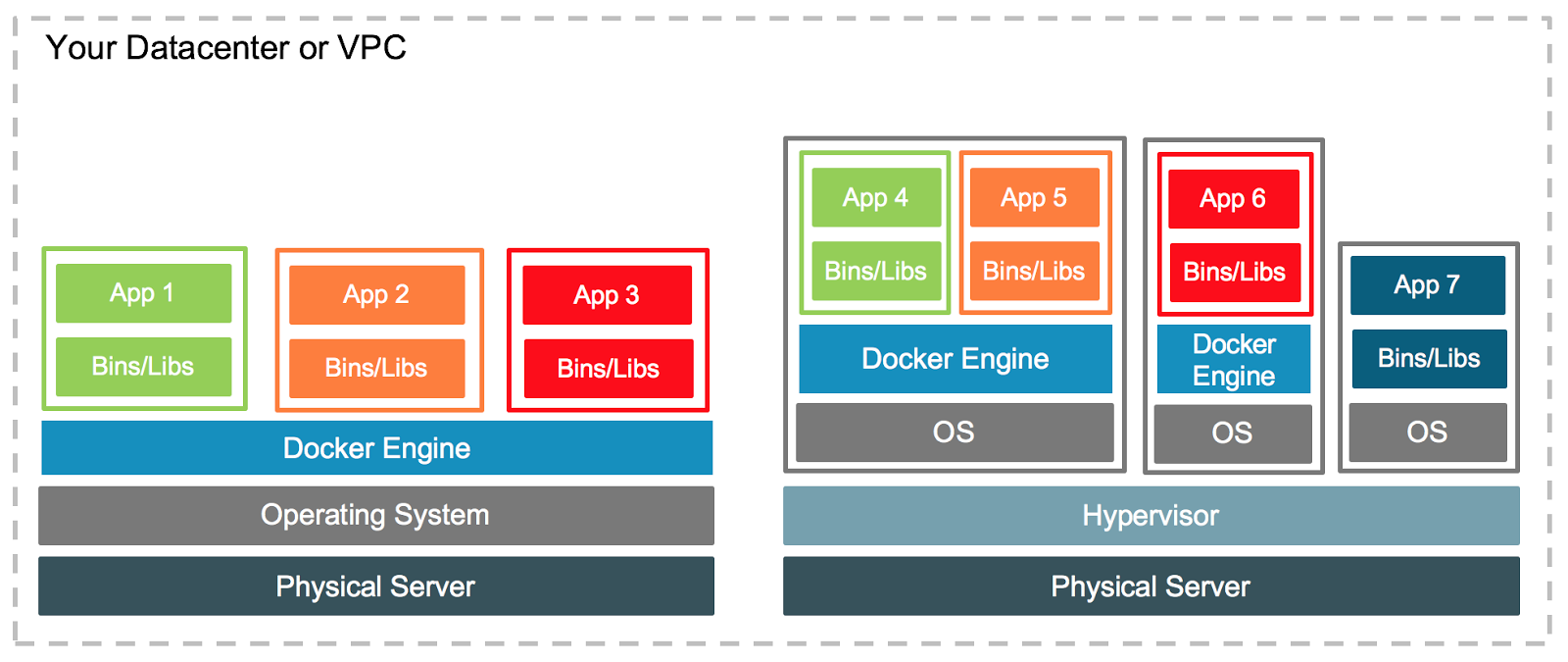
Both containers and virtual machines (VMs) provide isolation, but at different levels of the stack:
flowchart TB
    subgraph vm [Virtual Machines]
        direction TB
        hw_vm[Physical Hardware]:::infra
        hvm[Hypervisor]:::infra
        os1[Guest OS 1]:::customer
        os2[Guest OS 2]:::customer
        app1[App A]:::customer
        app2[App B]:::customer
        hw_vm --> hvm --> os1 & os2
        os1 --> app1
        os2 --> app2
    end
    subgraph ct [Containers]
        direction TB
        hw_ct[Physical Hardware]:::infra
        os_ct[Host OS + Kernel]:::infra
        engine[Container Engine]:::infra
        c1[Container A]:::customer
        c2[Container B]:::customer
        hw_ct --> os_ct --> engine --> c1 & c2
    end
    classDef infra fill:#a8e6cf,stroke:#333
    classDef customer fill:#ffd3b6,stroke:#333
Provider / shared layer Application layer
| Aspect | Docker Containers | Virtual Machines |
|---|---|---|
| Isolation | Process-level — share the host kernel | Full OS isolation — each VM has its own kernel |
| Resource overhead | Lightweight — no duplicate OS per container | Higher — each VM carries a complete OS |
| Startup time | Seconds | Minutes (full OS boot) |
| Portability | High — image bundles app and all dependencies | Lower — OS-specific configuration |
| Security boundary | Weaker (shared kernel) | Stronger (separate kernel) |
| Typical use | Microservices, CI/CD, horizontal scaling | Different guest OS, strong isolation requirements |
The key insight: containers share the host kernel, so they start in seconds and consume far less memory. VMs carry their own kernel — giving stronger isolation at the cost of higher overhead2.
In practice the two are combined, not opposed: a cloud provider rents you a VM (isolation between customers), and you run several containers on it (density and portability for your services).
What a container really is
A container is not a lightweight VM: it is an ordinary Linux process that the kernel shows a restricted view of the machine. Three kernel features make that possible:
| Feature | What it does | What you observe |
|---|---|---|
| Namespaces | Give the process its own view of a resource: process IDs (pid), network interfaces and ports (net), mounted filesystems (mnt), hostname (uts), users (user), IPC | Inside the container, ps shows your app as PID 1, and it has its own IP address and port 8080 |
| cgroups (control groups) | Limit and account for CPU, memory and I/O | docker run --memory 512m — the JVM is killed (OOM) if it exceeds 512 MB |
| Layered filesystem (OverlayFS) | Stack the read-only image layers and add a thin writable layer on top (copy-on-write) | Files you write inside the container disappear when the container is removed |
You can verify the "just a process" claim yourself:
docker run --rm alpine ps                               # inside: ps is PID 1, nothing else is visible
docker run -d --name pg -e POSTGRES_PASSWORD=secret postgres:17
docker top pg                                           # from the host: the postgres processes, with host PIDs
Docker on macOS and Windows
Namespaces and cgroups are Linux kernel features. Docker Desktop on macOS and Windows therefore runs a small Linux VM behind the scenes, and your containers run inside it. That is why bind-mounted files can be slower there, and why an image built for linux/arm64 (Apple Silicon) may need --platform linux/amd64 to match a cloud server.
Docker is one implementation of an open standard
Image format and runtime behaviour are standardised by the Open Container Initiative (OCI). An image built with docker build also runs on Podman, on containerd, and on Kubernetes — which, since version 1.24, no longer talks to Docker and runs containers through containerd or CRI-O.
The container lifecycle
flowchart LR
    src[Source Code\n+ Dockerfile] -->|docker build| img[Image\n:tag]
    img -->|docker push| reg[(Registry\nDocker Hub / ECR)]
    reg -->|docker pull| deploy[Any Host]
    deploy -->|docker run| c1[Container 1]
    deploy -->|docker run| c2[Container 2]
    deploy -->|docker run| c3[Container 3]
A Dockerfile describes how to build the image. An image is the immutable artifact — it gets versioned, stored in a registry, and pulled onto any machine. A container is a running instance of an image — isolated, ephemeral, and disposable1.
The lifecycle in the store
In Hands-on 1 the account service is packaged this way: mvn package produces the JAR, a Dockerfile copies it onto a Java base image, and docker compose up --build builds the image and starts it next to PostgreSQL. Later, in Hands-on 4, Jenkins runs the same build and pushes the image to a registry, and in Hands-on 5 Kubernetes pulls that image and runs several containers from it.
Pitfalls
- Treating a container like a server. Do not
docker execinto a container to install packages or edit files: the change is lost on the next deploy. Change the Dockerfile and rebuild. - Storing data in the container. The writable layer disappears with the container — persist databases in a volume (Docker › Volumes).
- Shipping
latest.myapp:latestpoints to whatever was pushed last; deploy explicit versions (myapp:1.4.2or a Git commit SHA) so you know exactly what runs and can roll back. - Assuming a container is a security boundary. All containers share the host kernel; a kernel exploit escapes them. Do not run untrusted code next to sensitive workloads without stronger isolation (VMs).
Topics covered
-
Docker
Core concepts of Docker: images, containers, the Docker Engine, Dockerfiles (including multi-stage builds), essential commands, networking, and volumes.
-
Docker Compose
Declarative multi-container orchestration with
compose.yaml. Covers service definitions, networking, volumes, environment variables, health checks, and dependency ordering.
Containerisation in the cloud
Docker and Compose run containers on one host. Running them across many hosts — restarting crashed containers, spreading replicas, rolling out new versions — is the job of an orchestrator such as Kubernetes3 (Hands-on 5). Cloud providers offer managed container services that add automatic scheduling, scaling, load balancing, and deep integration with other cloud services on top of the container model:
| Service | Provider | Model |
|---|---|---|
| ECS / Fargate | AWS | Managed containers — no cluster to operate |
| EKS | AWS | Managed Kubernetes |
| Cloud Run | Serverless containers — scales to zero | |
| GKE | Managed Kubernetes | |
| AKS | Azure | Managed Kubernetes |


Connections
- Hands-on 1 — Containerization — the account service and PostgreSQL in Docker Compose.
- Hands-on 4 — a CI pipeline that builds and publishes images.
- Hands-on 5 and the MiniKube exercise — running the same images on Kubernetes.
- Cloud Service Models and Cloud Deployment — where containers fit among IaaS, PaaS and managed container services.
Key takeaways
- Horizontal scaling needs identical environments; a container image packages the app with all its dependencies and ends "it works on my machine".
- A container is an isolated Linux process (namespaces + cgroups + layered filesystem), not a small VM: it shares the host kernel, starts in seconds and isolates less than a VM.
- Dockerfile → image → registry → container: the image is the immutable, versioned artifact; containers are disposable.
- Keep state out of containers (volumes) and ship explicit image versions, not
latest. - Docker and Compose run containers on one host; orchestrators and managed cloud services run them across many.
-
BURNS, B. et al. Kubernetes: Up and Running, 3rd ed. O'Reilly, 2022. ↩